


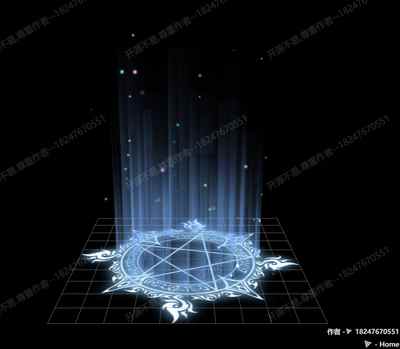
📷 魔法阵
Three.js 魔法圆
提示词
PROMPT
1
使用 Three.js 创建魔法圆效果,使用自定义类和动画实现魔法圆旋转效果。
效果描述
这是一个展示如何创建魔法圆效果的示例,使用自定义类和动画实现魔法圆旋转效果。
效果特性
- 魔法圆:创建魔法圆
- 自定义类:使用自定义类
- 动画效果:旋转动画效果
- 多层圆环:多层圆环效果
- 颜色渐变:颜色渐变效果
- 性能监控:Stats 性能监控
核心参数
| 参数 | 值 | 说明 |
|---|---|---|
| 圆环数量 | 可变 | 圆环数量 |
| 圆环半径 | 可变 | 圆环半径 |
| 旋转速度 | 可变 | 旋转速度 |
| 颜色渐变 | 可变 | 颜色渐变 |
| 线条宽度 | 可变 | 线条宽度 |
核心代码解析
创建核心类
JAVASCRIPT
1
2
3
4
5
6
7
8
9
10
11
12
13
14
15
16
17
18
19
20
21
22
23
24
25
26
27
28
29
30
31
32
33
34
35
36
37
38
39
40
41
42
43
44
45
46
47
48
49
50
51
52
53
54
55
56
57
58
59
60
61
62
63
64
65
66
67
68
69
70
71
72
73
class ThreeCore {
    dom;
    scene;
    camera;
    defaultCamera;
    renderer;
    clock;
    options;
    stats;
    animates;

    constructor(dom, options) {
        this.dom = dom;
        this.options = options;
        this.scene = new THREE.Scene();
        this.clock = new THREE.Clock();
        this.animates = {};

        const k = dom.clientWidth / dom.clientHeight;
        if ("fov" in options.cameraOptions) {
            this.defaultCamera = new THREE.PerspectiveCamera(options.cameraOptions.fov, k, options.cameraOptions.near, options.cameraOptions.far);
        } else {
            const s = options.cameraOptions.s;
            this.defaultCamera = new THREE.OrthographicCamera(-s * k, s * k, s, -s, options.cameraOptions.near, options.cameraOptions.far);
        }

        this.camera = this.defaultCamera;
        this.scene.add(this.camera);

        const rendererOptions = {
            antialias: true,
            alpha: true,
            logarithmicDepthBuffer: true
        };

        const renderer = new THREE.WebGLRenderer(Object.assign({}, rendererOptions, options.rendererOptions));
        renderer.setSize(dom.clientWidth, dom.clientHeight);
        renderer.setPixelRatio(window.devicePixelRatio);
        dom.appendChild(renderer.domElement);

        this.renderer = renderer;
        this.stats = new Stats();
        dom.appendChild(this.stats.dom);

        window.addEventListener("resize", this.onResize, false);

        setTimeout(() => {
            this.init();
            this.animate();
        }, 0);
    }

    animate() {
        this.renderer.setAnimationLoop(() => {
            this.onRenderer();
            this.stats.update();

            for (const key in this.animates) {
                this.animates[key](this.clock.getDelta());
            }

            this.renderer.render(this.scene, this.camera);
        });
    }

    addAnimate(name, func) {
        this.animates[name] = func;
    }

    removeAnimate(name) {
        delete this.animates[name];
    }
}
创建魔法圆
JAVASCRIPT
1
2
3
4
5
6
7
8
9
10
11
12
13
14
15
16
17
18
19
20
21
22
23
24
25
26
27
28
29
30
31
32
33
34
35
36
37
38
class MagicCircle extends ThreeCore {
    circles = [];

    init() {
        const circleCount = 5;

        for (let i = 0; i < circleCount; i++) {
            const radius = 2 + i * 0.5;
            const segments = 64;
            const geometry = new THREE.RingGeometry(radius - 0.05, radius, segments);

            const hue = i / circleCount;
            const color = new THREE.Color().setHSL(hue, 0.8, 0.5);

            const material = new THREE.MeshBasicMaterial({
                color: color,
                side: THREE.DoubleSide,
                transparent: true,
                opacity: 0.8
            });

            const circle = new THREE.Mesh(geometry, material);
            circle.rotation.x = Math.PI / 2;
            circle.userData = {
                rotationSpeed: (i % 2 === 0 ? 1 : -1) * (0.5 + i * 0.1)
            };

            this.scene.add(circle);
            this.circles.push(circle);
        }

        this.addAnimate('rotateCircles', (delta) => {
            this.circles.forEach(circle => {
                circle.rotation.z += circle.userData.rotationSpeed * delta;
            });
        });
    }
}
技术亮点
- 魔法圆:创建魔法圆
- 自定义类:使用自定义类
- 动画效果:旋转动画效果
- 多层圆环:多层圆环效果
- 颜色渐变:颜色渐变效果
调试技巧
- 圆环数量:调整圆环数量测试性能
- 圆环半径:调整圆环半径改变大小
- 旋转速度:调整旋转速度改变动画
- 颜色渐变:调整颜色渐变改变显示
- 线条宽度:调整线条宽度改变显示
扩展方向
- 复杂魔法圆:创建更复杂的魔法圆
- 动画效果:添加动画效果
- 交互控制:添加交互控制
- 粒子效果:添加粒子效果
- 自定义样式:支持自定义样式
本文档由 ThreeLab 编辑整理,如需转载,请注明出处。

 京公网安备 11010502038735号
💬 评论区
评论功能即将上线,敬请期待!