


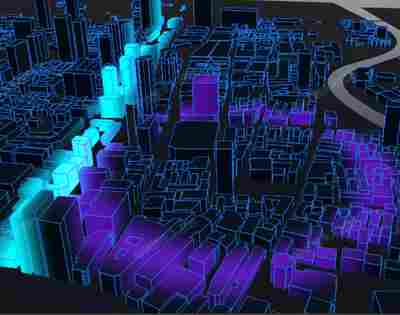
📷 城市特效
提示词
使用Three.js加载城市FBX模型,通过自定义着色器实现多种城市特效,包括建筑生长、上升光效、扩散波和扫光效果。
效果拆解
| 效果 | 实现方式 |
|---|---|
| 城市模型加载 | 使用FBXLoader加载上海城市模型 |
| 建筑生长 | 修改顶点着色器实现建筑从地面生长 |
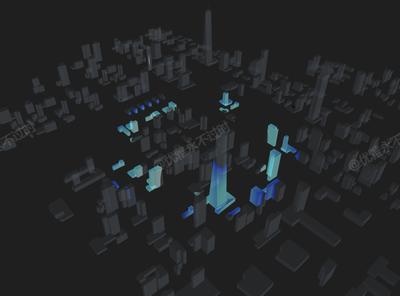
| 上升光效 | 在建筑表面添加流动上升的光效 |
| 扩散波效果 | 从中心向外扩散的彩色波纹 |
| 扫光效果 | 水平移动的扫光效果 |
| 天空盒 | 使用CubeTexture创建天空背景 |
核心技术点
1. 生长着色器
JAVASCRIPT
1
2
3
4
5
6
7
8
9
10
11
12
13
14
15
16
17
const applyGrowShader = (shader) => {
  shader.uniforms.uProgress = { value: 0 };
  shader.vertexShader = `
    uniform float uProgress;
    ${shader.vertexShader}
  `;
  shader.vertexShader = shader.vertexShader.replace(
    "#include <begin_vertex>",
    `
      #include <begin_vertex>
      transformed.z = position.z * min(uProgress, 1.0);
    `
  );
  renderList.push((progress) => {
    shader.uniforms.uProgress.value = progress;
  });
};
2. 上升光效着色器
JAVASCRIPT
1
2
3
4
5
6
7
8
9
10
11
12
13
14
15
16
17
18
19
20
21
22
23
24
25
26
27
28
29
30
31
32
33
34
35
36
37
38
39
40
41
42
43
44
45
46
47
48
49
50
const applyRiseShader = (shader) => {
  shader.uniforms.uRiseTime = { value: 0 };
  shader.uniforms.uRiseColor = { value: new THREE.Color("#87CEEB") };

  shader.vertexShader = shader.vertexShader.replace(
    "#include <common>",
    `
      #include <common>
      varying vec3 vTransformedNormal;
      varying float vHeight;
    `
  );
  shader.vertexShader = shader.vertexShader.replace(
    "#include <begin_vertex>",
    `
      #include <begin_vertex>
      vTransformedNormal = normalize(normal);
      vHeight = transformed.z;
    `
  );

  shader.fragmentShader = shader.fragmentShader.replace(
    "#include <common>",
    `
      #include <common>
      uniform vec3 uRiseColor;
      uniform float uRiseTime;
      varying float vHeight;
      varying vec3 vTransformedNormal;

      vec3 riseLine() {
        float smoothness = 1.8;
        float speed = uRiseTime;
        bool isTopBottom = (vTransformedNormal.z > 0.0 || vTransformedNormal.z < 0.0) && vTransformedNormal.x == 0.0 && vTransformedNormal.y == 0.0;
        float ratio = isTopBottom ? 0.0 : smoothstep(speed, speed + smoothness, vHeight) - smoothstep(speed + smoothness, speed + smoothness * 2.0, vHeight);
        return uRiseColor * ratio;
      }
    `
  );
  shader.fragmentShader = shader.fragmentShader.replace(
    "#include <dithering_fragment>",
    `
      #include <dithering_fragment>
      gl_FragColor = gl_FragColor + vec4(riseLine(), 1.0);
    `
  );
  renderList.push((time) => {
    shader.uniforms.uRiseTime.value = time * 30.0;
  });
};
3. 扩散波着色器
JAVASCRIPT
1
2
3
4
5
6
7
8
9
10
11
12
13
14
15
16
17
18
19
20
21
22
23
24
25
26
27
28
29
30
31
32
33
34
35
36
37
38
39
40
41
42
43
44
45
46
47
const applySpreadShader = (shader) => {
  shader.uniforms.uSpreadTime = { value: 0 };
  shader.uniforms.uSpreadColor = { value: new THREE.Color("#9932CC") };

  shader.vertexShader = shader.vertexShader.replace(
    "#include <common>",
    `
      #include <common>
      varying vec2 vTransformedPosition;
    `
  );
  shader.vertexShader = shader.vertexShader.replace(
    "#include <begin_vertex>",
    `
      #include <begin_vertex>
      vTransformedPosition = vec2(position.x, position.y);
    `
  );
  shader.fragmentShader = shader.fragmentShader.replace(
    "#include <common>",
    `
      #include <common>
      uniform vec3 uSpreadColor;
      uniform float uSpreadTime;
      varying vec2 vTransformedPosition;

      vec3 spread() {
        vec2 center = vec2(0.0);
        float smoothness = 60.0;
        float start = mod(uSpreadTime, 1800.0);
        float distance = length(vTransformedPosition - center);
        float ratio = smoothstep(start, start + smoothness, distance) - smoothstep(start + smoothness, start + smoothness * 2.0, distance);
        return uSpreadColor * ratio;
      }
    `
  );
  shader.fragmentShader = shader.fragmentShader.replace(
    "#include <dithering_fragment>",
    `
      #include <dithering_fragment>
      gl_FragColor = gl_FragColor + vec4(spread(), 1.0);
    `
  );
  renderList.push((time) => {
    shader.uniforms.uSpreadTime.value = time * 200.0;
  });
};
4. 扫光着色器
JAVASCRIPT
1
2
3
4
5
6
7
8
9
10
11
12
13
14
15
16
17
18
19
20
21
22
23
24
25
26
27
28
29
30
31
32
33
34
35
36
37
38
39
40
41
42
43
44
45
46
const applySweepShader = (shader) => {
  shader.uniforms.uSweepTime = { value: 0 };
  shader.uniforms.uSweepColor = { value: new THREE.Color("#00FFFF") };

  shader.vertexShader = shader.vertexShader.replace(
    "#include <common>",
    `
      #include <common>
      varying vec2 vSweepPosition;
    `
  );
  shader.vertexShader = shader.vertexShader.replace(
    "#include <begin_vertex>",
    `
      #include <begin_vertex>
      vSweepPosition = vec2(position.x, position.y);
    `
  );
  shader.fragmentShader = shader.fragmentShader.replace(
    "#include <common>",
    `
      #include <common>
      uniform vec3 uSweepColor;
      uniform float uSweepTime;
      varying vec2 vSweepPosition;

      vec3 sweep() {
        vec2 center = vec2(0.0);
        float smoothness = 60.0;
        float start = mod(uSweepTime, 1800.0) - 800.0;
        float ratio = smoothstep(start, start + smoothness, vSweepPosition.x) - smoothstep(start + smoothness, start + smoothness * 2.0, vSweepPosition.x);
        return uSweepColor * ratio;
      }
    `
  );
  shader.fragmentShader = shader.fragmentShader.replace(
    "#include <dithering_fragment>",
    `
      #include <dithering_fragment>
      gl_FragColor = gl_FragColor + vec4(sweep(), 1.0);
    `
  );
  renderList.push((time) => {
    shader.uniforms.uSweepTime.value = time * 160.0;
  });
};
5. 模型处理映射
JAVASCRIPT
1
2
3
4
5
6
7
8
9
10
11
12
13
14
15
16
17
18
19
20
21
22
23
24
25
26
27
28
29
30
31
32
33
const modelHandlerMap = {
  CITY_UNTRIANGULATED: (model, group) => {
    const { geometry, position, material } = model;
    const lineMat = new THREE.LineBasicMaterial({ color: "#2685fe" });
    const lineBox = new THREE.LineSegments(
      new THREE.EdgesGeometry(geometry, 1),
      lineMat
    );
    lineBox.position.copy(position);
    lineBox.rotateX(-Math.PI / 2);
    group.add(lineBox);

    material.onBeforeCompile = (shader) => {
      material.color = new THREE.Color("#0e233d");
      material.transparent = true;
      material.opacity = 0.9;
      applyGrowShader(shader);
      applyRiseShader(shader);
      applySpreadShader(shader);
      applySweepShader(shader);
    };
    lineMat.onBeforeCompile = (shader) => applyGrowShader(shader));
  },
  LANDMASS: (model) => {
    const m = model.material;
    m.color = new THREE.Color("#040912");
    m.transparent = true;
    m.opacity = 0.8;
  },
  ROADS: (model) => {
    model.material.color = new THREE.Color("#292e4c");
  },
};
调试技巧
- 生长速度:调整uProgress的更新速度控制建筑生长快慢
- 光效颜色:修改uRiseColor、uSpreadColor、uSweepColor改变光效颜色
- 光效强度:调整smoothstep参数改变光效的柔和度
- 扫描范围:修改mod函数的参数调整扫描循环范围
扩展思路
- 交互控制:添加GUI面板控制各种效果的参数
- 音频响应:根据音频频率改变光效强度和速度
- 多城市切换:支持加载不同城市模型
- 日夜交替:实现光照随时间变化的效果
- 粒子效果:添加城市上空的粒子特效
- 数据可视化:在城市模型上叠加数据可视化效果

 京公网安备 11010502038735号
💬 评论区
评论功能即将上线,敬请期待!