Three.js 行星粒子效果

提示词

PROMPT
1
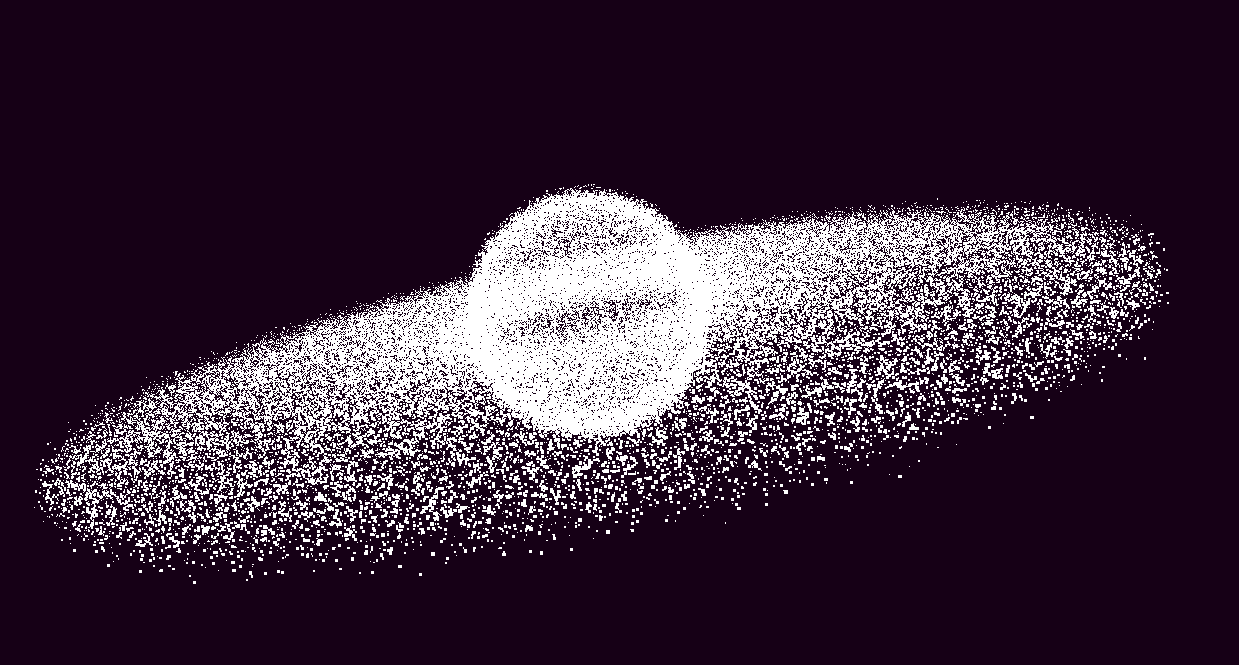
使用 Three.js 创建行星粒子效果,粒子围绕中心旋转,使用自定义着色器实现颜色渐变和粒子运动。

效果描述

这是一个展示如何创建行星粒子效果的示例,粒子围绕中心旋转。

效果特性

  • 行星粒子:创建 150000 个粒子
  • 中心分布:粒子围绕中心分布
  • 旋转动画:粒子围绕中心旋转
  • 颜色渐变:粒子颜色从内到外渐变
  • 自定义着色器:使用自定义着色器
  • 加法混合:使用 AdditiveBlending

核心参数

参数 说明
粒子数量 150000 粒子总数
内半径 10 内部半径
外半径 40 外部半径
内颜色 #e39b00 内部颜色
外颜色 #6432ff 外部颜色
粒子大小 0.125 粒子大小

核心代码解析

创建粒子

JAVASCRIPT
1
2
3
4
5
6
7
8
9
10
11
12
13
14
15
16
17
18
19
20
21
22
23
24
25
26
27
28
29
30
31
32
33
let sizes = [];
let shift = [];
let pushShift = () => {
    shift.push(
        Math.random() * Math.PI,
        Math.random() * Math.PI * 2,
        (Math.random() * 0.9 + 0.1) * Math.PI * 0.1,
        Math.random() * 0.9 + 0.1
    );
};

let pts = new Array(50000).fill().map((p) => {
    sizes.push(Math.random() * 1.5 + 0.5);
    pushShift();
    return new THREE.Vector3()
        .randomDirection()
        .multiplyScalar(Math.random() * 0.5 + 9.5);
});

for (let i = 0; i < 100000; i++) {
    let r = 10, R = 40;
    let rand = Math.pow(Math.random(), 1.5);
    let radius = Math.sqrt(R * R * rand + (1 - rand) * r * r);
    pts.push(
        new THREE.Vector3().setFromCylindricalCoords(
            radius,
            Math.random() * 2 * Math.PI,
            (Math.random() - 0.5) * 2
        )
    );
    sizes.push(Math.random() * 1.5 + 0.5);
    pushShift();
}

自定义着色器

JAVASCRIPT
1
2
3
4
5
6
7
8
9
10
11
12
13
14
15
16
17
18
19
20
21
22
23
24
25
26
27
28
29
30
31
32
33
34
35
36
37
38
39
40
41
42
43
44
45
46
let m = new THREE.PointsMaterial({
    size: 0.125,
    transparent: true,
    depthTest: false,
    blending: THREE.AdditiveBlending,
    onBeforeCompile: (shader) => {
        shader.uniforms.time = gu.time;
        shader.vertexShader = `
            uniform float time;
            attribute float sizes;
            attribute vec4 shift;
            varying vec3 vColor;
            ${shader.vertexShader}
        `
        .replace(`gl_PointSize = size;`, `gl_PointSize = size * sizes;`)
        .replace(
            `#include <color_vertex>`,
            `#include <color_vertex>
            float d = length(abs(position) / vec3(40., 10., 40.));
            d = clamp(d, 0., 1.);
            vColor = mix(vec3(227., 155., 0.), vec3(100., 50., 255.), d) / 255.;`
        )
        .replace(
            `#include <begin_vertex>`,
            `#include <begin_vertex>
            float t = time;
            float moveT = mod(shift.x + shift.z * t, PI2);
            float moveS = mod(shift.y + shift.z * t, PI2);
            transformed += vec3(cos(moveS) * sin(moveT), cos(moveT), sin(moveS) * sin(moveT)) * shift.w;`
        );
        shader.fragmentShader = `
            varying vec3 vColor;
            ${shader.fragmentShader}
        `
        .replace(
            `#include <clipping_planes_fragment>`,
            `#include <clipping_planes_fragment>
            float d = length(gl_PointCoord.xy - 0.5);`
        )
        .replace(
            `float d = length(gl_PointCoord.xy - 0.5);
            vec4 diffuseColor = vec4( diffuse, opacity );`,
            `vec4 diffuseColor = vec4( vColor, smoothstep(0.5, 0.1, d) );`
        );
    },
});

技术亮点

  1. 行星分布:粒子围绕中心分布
  2. 旋转动画:粒子围绕中心旋转
  3. 颜色渐变:粒子颜色从内到外渐变
  4. 自定义着色器:使用自定义着色器
  5. 加法混合:使用 AdditiveBlending

调试技巧

  1. 粒子数量:调整粒子数量测试性能
  2. 半径范围:调整内外半径改变分布
  3. 颜色渐变:调整颜色渐变参数
  4. 旋转速度:调整旋转速度
  5. 粒子大小:调整粒子大小

扩展方向

  1. 多层行星:创建多层行星效果
  2. 不同形状:使用不同的粒子分布形状
  3. 颜色动画:添加颜色动画
  4. 交互控制:添加交互控制
  5. 复杂运动:实现更复杂的粒子运动

本文档由 ThreeLab 编辑整理,如需转载,请注明出处。