Three.js 粒子散布效果
提示词
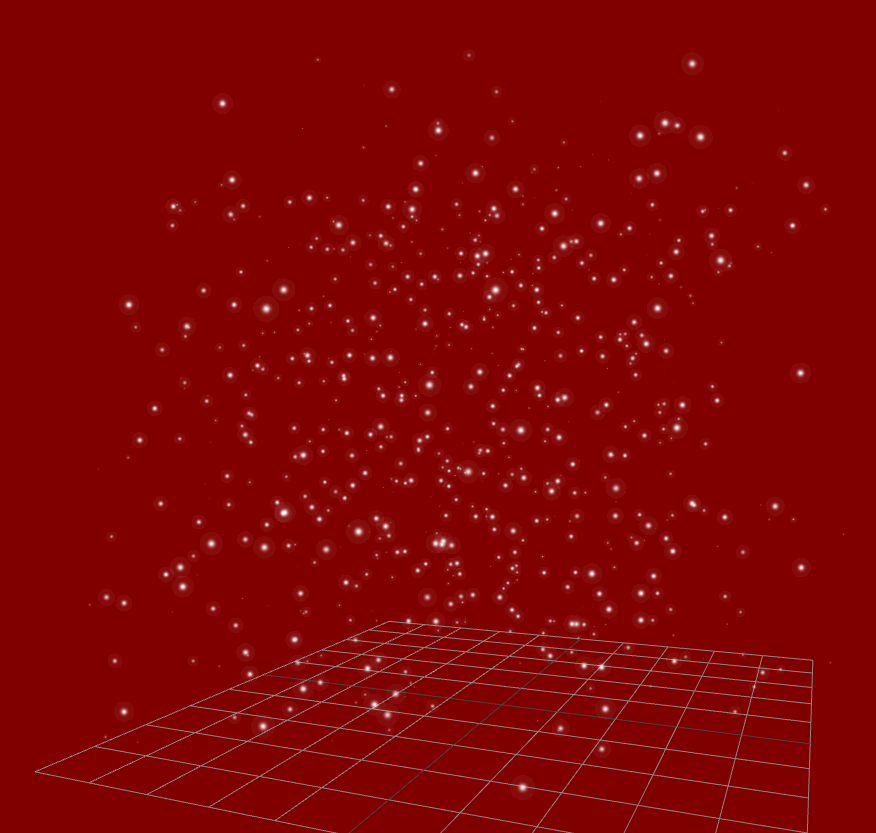
使用 Three.js 创建粒子散布效果,粒子从随机位置向中心汇聚,使用 TWEEN 实现动画。
效果描述
这是一个展示如何创建粒子散布效果的示例,粒子从随机位置向中心汇聚。
效果特性
- 粒子汇聚:粒子从随机位置向中心汇聚
- TWEEN 动画:使用 TWEEN 库实现动画
- 圆柱分布:粒子在圆柱体内分布
- 黄色粒子:使用黄色粒子
- 加法混合:使用 AdditiveBlending
- 粒子旋转:粒子系统旋转
核心参数
| 参数 |
值 |
说明 |
| 粒子数量 |
3000 |
粒子总数 |
| 分布范围 |
-4 到 4 |
粒子分布范围 |
| 粒子颜色 |
#fdfd03 |
黄色 |
| 粒子大小 |
0.1 |
粒子大小 |
| 动画时长 |
2000-7000ms |
动画时长 |
核心代码解析
创建粒子动画1
1
2
3
4
5
6
7
8
9
10
11
12
13
14
15
16
17
18
19
20
21
22
23
24
25
26
27
28
29
30
31
32
33
34
35
36
37
38
39
40
41
42
43
44
45
46
47
48
49
50
51
52
function createParticleAnimation1() {
    const particlesGeometry = new THREE.BufferGeometry();
    const count = 3000;
    const positions = new Float32Array(count * 3);
    const colors = new Float32Array(count * 3);

    for (let i = 0; i < count; i += 3) {
        positions[i] = THREE.MathUtils.randFloat(-4, 4);
        positions[i + 1] = THREE.MathUtils.randFloat(-4, 4);
        positions[i + 2] = THREE.MathUtils.randFloat(5, 10);

        colors[i] = 253 / 255;
        colors[i + 1] = 253 / 255;
        colors[i + 2] = 0.2;
    }

    particlesGeometry.setAttribute("position", new THREE.BufferAttribute(positions, 3));
    particlesGeometry.setAttribute("color", new THREE.BufferAttribute(colors, 3));

    const pointMaterial = new THREE.PointsMaterial({
        size: 0.1,
        sizeAttenuation: true,
        transparent: true,
        opacity: 1,
        blending: THREE.AdditiveBlending,
        vertexColors: true,
    });

    particles = new THREE.Points(particlesGeometry, pointMaterial);
    scene.add(particles);

    const particleStartPositions = particlesGeometry.getAttribute("position");
    for (let i = 0; i < particleStartPositions.count; i++) {
        const tween = new TWEEN.Tween(positions);
        tween.to(
            {
                [i * 3]: 0,
                [i * 3 + 1]: 0,
                [i * 3 + 2]: 0,
            },
            5000 * Math.random()
        );

        tween.easing(TWEEN.Easing.Exponential.In);
        tween.delay(2000);
        tween.onUpdate(() => {
            particleStartPositions.needsUpdate = true;
        });

        tween.start();
    }
}
创建粒子动画2
1
2
3
4
5
6
7
8
9
10
11
12
13
14
15
16
17
18
19
20
21
22
23
24
25
26
27
28
29
30
31
32
33
34
35
36
37
38
39
40
function createParticleAnimation2() {
    const particleCount = 2000;
    const particles = new THREE.BufferGeometry();
    const pointMaterial = new THREE.PointsMaterial({
        size: 0.1,
        sizeAttenuation: true,
        transparent: true,
        opacity: 0,
        blending: THREE.AdditiveBlending,
        vertexColors: true,
    });

    const cubeWidth = 0.5;
    const cubeHeight = 2;
    const positions = new Float32Array(particleCount * 3);
    const colors = new Float32Array(particleCount * 3);

    for (let i = 0; i < particleCount; i += 3) {
        const angle = Math.random() * Math.PI * 2;
        const radius = Math.random() * cubeWidth;

        const x = Math.cos(angle) * radius;
        const y = THREE.MathUtils.randFloat(-cubeHeight / 2, cubeHeight / 2);
        const z = Math.sin(angle) * radius;

        positions[i] = x;
        positions[i + 1] = y;
        positions[i + 2] = z;

        colors[i] = 253 / 255;
        colors[i + 1] = 253 / 255;
        colors[i + 2] = 0.2;
    }

    particles.setAttribute("position", new THREE.BufferAttribute(positions, 3));
    particles.setAttribute("color", new THREE.BufferAttribute(colors, 3));

    particleSystem = new THREE.Points(particles, pointMaterial);
    scene.add(particleSystem);
}
技术亮点
- 粒子汇聚:粒子从随机位置向中心汇聚
- TWEEN 动画:使用 TWEEN 库实现动画
- 圆柱分布:粒子在圆柱体内分布
- 黄色粒子:使用黄色粒子
- 加法混合:使用 AdditiveBlending
调试技巧
- 粒子数量:调整粒子数量测试性能
- 分布范围:调整粒子分布范围
- 动画时长:调整动画时长
- 粒子颜色:调整粒子颜色
- 粒子大小:调整粒子大小
扩展方向
- 多种颜色:使用多种颜色
- 不同形状:使用不同的分布形状
- 复杂动画:实现更复杂的动画
- 交互控制:添加交互控制
- 多层粒子:创建多层粒子效果
本文档由 ThreeLab 编辑整理,如需转载,请注明出处。




 京公网安备 11010502038735号
💬 评论区
评论功能即将上线,敬请期待!