提示词
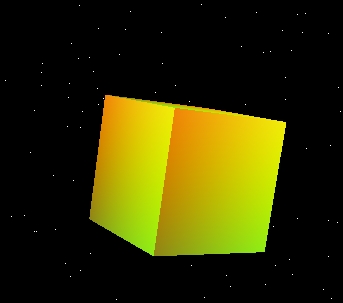
使用Three.js的ShaderMaterial创建一个动态旋转的立方体,配合粒子星空背景,实现炫酷的视觉效果。
效果拆解
| 效果 |
实现方式 |
| 立方体创建 |
使用BoxGeometry创建基础几何体 |
| 动态着色器 |
使用ShaderMaterial实现颜色随时间变化 |
| 粒子星空 |
使用BufferGeometry和PointsMaterial创建星星背景 |
| 旋转动画 |
在渲染循环中更新立方体旋转角度 |
| 颜色渐变 |
使用余弦函数实现平滑的颜色过渡 |
核心技术点
1. 着色器材质创建
1
2
3
4
5
6
7
8
9
10
11
12
13
14
15
16
17
18
19
20
21
const material = new THREE.ShaderMaterial({
  vertexShader: `
    varying vec2 vUv;
    void main() {
      vUv = uv;
      gl_Position = projectionMatrix * modelViewMatrix * vec4(position, 1.0);
    }
  `,
  fragmentShader: `
    uniform float time;
    varying vec2 vUv;
    void main() {
      vec2 uv = vUv;
      vec3 color = vec3(0.5 + 0.5 * cos(time + uv.xyx + vec3(0, 2, 4)));
      gl_FragColor = vec4(color, 1.0);
    }
  `,
  uniforms: {
    time: { value: 0 }
  }
});
2. 粒子星空创建
const starGeometry = new THREE.BufferGeometry();
const starVertices = [];
for (let i = 0; i < 10000; i++) {
  const x = (Math.random() - 0.5) * 2000;
  const y = (Math.random() - 0.5) * 2000;
  const z = -Math.random() * 2000;
  starVertices.push(x, y, z);
}
starGeometry.setAttribute('position', new THREE.Float32BufferAttribute(starVertices, 3));
const starMaterial = new THREE.PointsMaterial({ color: 0xffffff, size: 0.1 });
const stars = new THREE.Points(starGeometry, starMaterial);
scene.add(stars);
3. 动画循环
const clock = new THREE.Clock();
function animate() {
  requestAnimationFrame(animate);

  const elapsedTime = clock.getElapsedTime();
  material.uniforms.time.value = elapsedTime;

  cube.rotation.x += 0.01;
  cube.rotation.y += 0.01;

  renderer.render(scene, camera);
}
调试技巧
- 着色器调试:使用简单的颜色测试着色器是否正常工作
- 粒子数量:根据性能需求调整星星数量
- 旋转速度:调整旋转增量获得不同的动画效果
- 颜色变化:修改着色器中的颜色公式获得不同的渐变效果
扩展思路
- 交互控制:添加鼠标控制旋转速度和方向
- 多种形状:支持切换不同的几何体形状
- 音频响应:根据音频频率改变颜色和旋转速度
- 光照效果:添加动态光照增强立体感
- 后处理:使用EffectComposer添加辉光等后期效果
- 多物体场景:创建多个旋转物体组成复杂场景





 京公网安备 11010502038735号
💬 评论区
评论功能即将上线,敬请期待!