Three.js 3D饼图

提示词

PROMPT
1
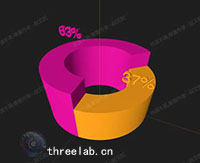
使用 Three.js 创建3D饼图,使用 ExtrudeGeometry 和 TextGeometry 实现三维饼图效果。

效果描述

这是一个展示如何创建3D饼图的示例,使用 ExtrudeGeometry 和 TextGeometry 实现三维饼图效果。

效果特性

  • 3D饼图:创建3D饼图
  • 挤压几何:使用 ExtrudeGeometry
  • 文字几何:使用 TextGeometry
  • 颜色区分:颜色区分不同扇形
  • 高度差异:不同高度扇形
  • 文字标签:显示文字标签

核心参数

参数 说明
外半径 100 外半径
内半径 60 内半径
起始角度 45 起始角度
扇形高度 可变 扇形高度
扇形颜色 可变 扇形颜色

核心代码解析

创建饼图块

JAVASCRIPT
1
2
3
4
5
6
7
8
9
10
11
12
13
14
15
16
17
18
19
20
21
22
23
function createPieBlock(outR, innerR, h, startAngle, angleLength, color, rateText) {
    const shape = new THREE.Shape();
    shape.absarc(0, 0, outR, (Math.PI / 180) * startAngle, (Math.PI / 180) * (startAngle + angleLength));
    shape.lineTo(shape.currentPoint.x * (innerR / outR), shape.currentPoint.y * (innerR / outR));
    shape.absarc(0, 0, innerR, (Math.PI / 180) * (startAngle + angleLength), (Math.PI / 180) * startAngle, true);

    const extrudeSettings = {
        curveSegments: 100,
        steps: 2,
        depth: h,
        bevelEnabled: true,
        bevelThickness: 1,
        bevelSize: 0,
        bevelOffset: 0,
        bevelSegments: 1,
    };

    const geometry = new THREE.ExtrudeGeometry(shape, extrudeSettings);
    const material = new THREE.MeshPhongMaterial({ color: color });
    const mesh = new THREE.Mesh(geometry, material);
    mesh.rotation.x = Math.PI / 2;
    return mesh;
}

创建文字标签

JAVASCRIPT
1
2
3
4
5
6
7
8
9
10
11
12
13
14
15
16
17
18
function createTextLabel(text, position) {
    const textGeometry = new TextGeometry(text, {
        font: font,
        size: 10,
        height: 2,
        curveSegments: 12,
        bevelEnabled: true,
        bevelThickness: 0.5,
        bevelSize: 0.3,
        bevelOffset: 0,
        bevelSegments: 5
    });

    const textMaterial = new THREE.MeshPhongMaterial({ color: 0xffffff });
    const textMesh = new THREE.Mesh(textGeometry, textMaterial);
    textMesh.position.copy(position);
    return textMesh;
}

创建饼图

JAVASCRIPT
1
2
3
4
5
6
7
8
9
10
11
12
13
14
15
16
17
18
19
20
const group = new THREE.Group();
group.rotateX(-(Math.PI / 180) * 90);
scene.add(group);

const outR = 100;
const innerR = 60;
const startAngle = 45;

const h1 = 100;
const color1 = 0xe20f9f;
let angleLength1 = 160;

const h2 = 70;
const color2 = 0xffa500;

const pie1 = createPieBlock(outR, innerR, h1, startAngle, angleLength1, color1, "50%");
group.add(pie1);

const pie2 = createPieBlock(outR, innerR, h2, startAngle + angleLength1, 360 - angleLength1, color2, "50%");
group.add(pie2);

技术亮点

  1. 3D饼图:创建3D饼图
  2. 挤压几何:使用 ExtrudeGeometry
  3. 文字几何:使用 TextGeometry
  4. 颜色区分:颜色区分不同扇形
  5. 高度差异:不同高度扇形

调试技巧

  1. 外半径:调整外半径改变饼图大小
  2. 内半径:调整内半径改变饼图形状
  3. 起始角度:调整起始角度改变饼图位置
  4. 扇形高度:调整扇形高度改变显示
  5. 扇形颜色:调整扇形颜色改变显示

扩展方向

  1. 复杂饼图:创建更复杂的饼图
  2. 动画效果:添加动画效果
  3. 交互控制:添加交互控制
  4. 数据绑定:支持数据绑定
  5. 自定义样式:支持自定义样式

本文档由 ThreeLab 编辑整理,如需转载,请注明出处。