Three.js 挤压几何体三色分离
提示词
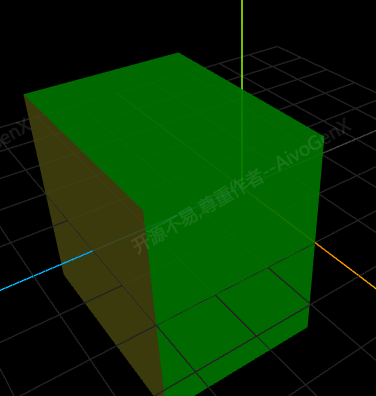
使用 Three.js 的 ExtrudeGeometry 创建挤压几何体,实现顶面、底面和侧面的不同颜色分离效果。
效果描述
这是一个展示如何为挤压几何体的不同面设置不同颜色的示例。
效果特性
- 挤压几何体:使用 ExtrudeGeometry 创建挤压几何体
- 三色分离:顶面、底面、侧面使用不同颜色
- 材质组:使用材质组管理不同面
- 法向量分析:通过法向量确定面类型
- 自定义几何体:继承 ExtrudeGeometry 实现自定义功能
- 交互控制:提供旋转控制按钮
核心参数
| 参数 |
值 |
说明 |
| 顶面颜色 |
#ffff00 |
黄色 |
| 底面颜色 |
#00ff00 |
绿色 |
| 侧面颜色 |
默认 |
侧面颜色 |
| 挤压深度 |
可变 |
挤压深度 |
| 形状 |
可变 |
挤压形状 |
核心代码解析
自定义挤压几何体
1
2
3
4
5
6
7
8
9
10
11
12
13
14
15
16
17
18
19
20
21
22
23
24
25
26
27
28
29
30
31
32
33
34
35
36
37
38
39
40
41
42
43
44
45
46
47
48
49
50
51
52
53
54
55
56
57
58
59
60
61
62
63
64
class ThreeColorExtrudeGeometry extends THREE.ExtrudeGeometry {
    constructor(shape, options) {
        super(shape, options);
        this.regroupFaces();
    }

    regroupFaces() {
        const groups = this.groups;
        const index = this.index;

        if (!index) return;

        groups.length = 0;
        const position = this.attributes.position;
        const faceCount = index.count / 3;

        for (let i = 0; i < faceCount; i++) {
            const a = index.getX(i * 3);
            const b = index.getX(i * 3 + 1);
            const c = index.getX(i * 3 + 2);

            const vA = new THREE.Vector3().fromBufferAttribute(position, a);
            const vB = new THREE.Vector3().fromBufferAttribute(position, b);
            const vC = new THREE.Vector3().fromBufferAttribute(position, c);

            const normal = new THREE.Vector3();
            const cb = new THREE.Vector3();
            const ab = new THREE.Vector3();

            cb.subVectors(vC, vB);
            ab.subVectors(vA, vB);
            cb.cross(ab);
            normal.copy(cb).normalize();

            let materialIndex = 2;

            if (Math.abs(normal.y) > 0.9) {
                materialIndex = normal.y > 0 ? 0 : 1;
            }

            const start = i * 3;
            const count = 3;

            let groupIndex = groups.findIndex(g => g.materialIndex === materialIndex);
            if (groupIndex === -1) {
                groups.push({
                    start: start,
                    count: count,
                    materialIndex: materialIndex
                });
            } else {
                groups[groupIndex].count += count;
            }
        }

        groups.sort((a, b) => a.materialIndex - b.materialIndex);

        let currentStart = 0;
        for (let i = 0; i < groups.length; i++) {
            groups[i].start = currentStart;
            currentStart += groups[i].count;
        }
    }
}
创建材质数组
const materials = [
new THREE.MeshBasicMaterial({ color: 0xffff00 }),
new THREE.MeshBasicMaterial({ color: 0x00ff00 }),
new THREE.MeshBasicMaterial({ color: 0x0000ff })
];
技术亮点
- 自定义几何体:继承 ExtrudeGeometry
- 材质组:使用材质组管理不同面
- 法向量分析:通过法向量确定面类型
- 三色分离:顶面、底面、侧面不同颜色
- 交互控制:提供旋转控制
调试技巧
- 法向量阈值:调整法向量阈值
- 材质颜色:调整材质颜色
- 挤压参数:调整挤压参数
- 形状参数:调整形状参数
- 旋转控制:测试旋转效果
扩展方向
- 多面颜色:为更多面设置不同颜色
- 纹理贴图:为不同面设置不同纹理
- 动态更新:动态更新材质
- 复杂形状:创建复杂挤压形状
- 动画效果:添加动画效果
本文档由 ThreeLab 编辑整理,如需转载,请注明出处。





 京公网安备 11010502038735号
💬 评论区
评论功能即将上线,敬请期待!