Three.js 烟雾空气效果
提示词
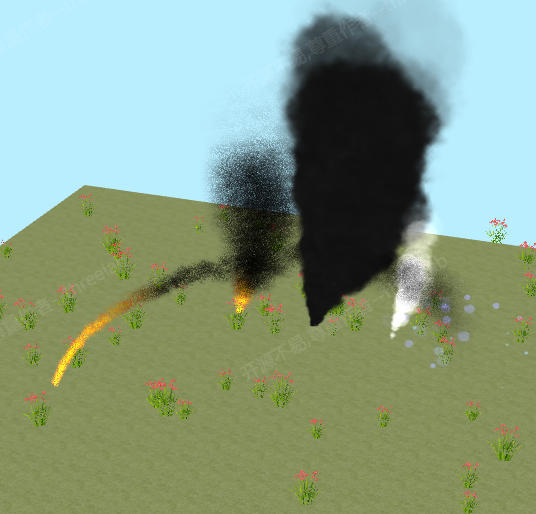
使用 Three.js 创建烟雾空气效果,使用粒子系统和纹理实现烟雾和空气流动效果。
效果描述
这是一个展示如何创建烟雾空气效果的示例,使用粒子系统和纹理实现烟雾和空气流动效果。
效果特性
- 烟雾效果:创建烟雾效果
- 粒子系统:使用粒子系统
- 纹理动画:纹理动画效果
- 多种纹理:烟雾、火焰、草地纹理
- 自定义着色器:自定义着色器
- 透明度混合:透明度混合
核心参数
| 参数 |
值 |
说明 |
| 粒子数量 |
可变 |
粒子数量 |
| 纹理类型 |
多种 |
纹理类型 |
| 透明度 |
可变 |
透明度 |
| 混合模式 |
可变 |
混合模式 |
| 动画速度 |
可变 |
动画速度 |
核心代码解析
加载纹理
const texture_loader = new THREE.TextureLoader();

tex["smoke"] = texture_loader.load("data:image/png;base64,...");
tex["fire"] = texture_loader.load("data:image/png;base64,...");
tex["grass"] = texture_loader.load("data:image/png;base64,...");
tex["floor"] = texture_loader.load("data:image/png;base64,...");
tex["floor"].wrapS = tex["floor"].wrapT = THREE.RepeatWrapping;
tex["floor"].repeat.set(20, 20);
顶点着色器
1
2
3
4
5
6
7
8
9
10
11
12
13
14
15
16
17
18
19
20
21
22
23
24
25
26
27
28
29
attribute vec3 offset;
attribute vec2 scale;
attribute vec4 quaternion;
attribute float rotation;
attribute vec4 color;
attribute float blend;
attribute float texture;
uniform float time;
varying vec2 vUv;
varying vec4 vColor;
varying float vBlend;
varying float num;
vec3 localUpVector = vec3(0.0, 1.0, 0.0);

void main() {
    vUv = uv;
    vColor = color;
    vBlend = blend;
    num = texture;

    vec3 positionOffset = offset;
    vec3 scaleVector = vec3(scale.x, scale.y, 1.0);

    vec4 worldPosition = modelMatrix * vec4(position, 1.0);
    worldPosition.xyz += positionOffset;
    worldPosition.xyz *= scaleVector;

    gl_Position = projectionMatrix * viewMatrix * worldPosition;
}
片段着色器
1
2
3
4
5
6
7
8
9
10
11
12
13
14
15
16
17
18
19
20
21
22
varying vec2 vUv;
varying vec4 vColor;
varying float vBlend;
varying float num;
uniform sampler2D texSmoke;
uniform sampler2D texFire;
uniform sampler2D texGrass;

void main() {
    vec4 texColor;

    if (num < 0.5) {
        texColor = texture2D(texSmoke, vUv);
    } else if (num < 1.5) {
        texColor = texture2D(texFire, vUv);
    } else {
        texColor = texture2D(texGrass, vUv);
    }

    gl_FragColor = texColor * vColor;
    gl_FragColor.a *= vBlend;
}
技术亮点
- 烟雾效果:创建烟雾效果
- 粒子系统:使用粒子系统
- 纹理动画:纹理动画效果
- 多种纹理:烟雾、火焰、草地纹理
- 自定义着色器:自定义着色器
调试技巧
- 粒子数量:调整粒子数量测试性能
- 纹理类型:调整纹理类型改变效果
- 透明度:调整透明度改变显示
- 混合模式:调整混合模式改变效果
- 动画速度:调整动画速度改变效果
扩展方向
- 复杂烟雾:创建更复杂的烟雾效果
- 交互控制:添加交互控制
- 多种粒子:支持多种粒子效果
- 物理模拟:添加物理模拟
- 自定义粒子:支持自定义粒子
本文档由 ThreeLab 编辑整理,如需转载,请注明出处。




 京公网安备 11010502038735号
💬 评论区
评论功能即将上线,敬请期待!