提示词
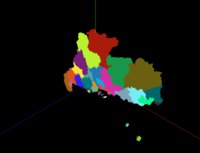
使用Three.js加载GeoJSON地图数据,通过坐标转换和ExtrudeGeometry创建3D地图效果,实现地理数据的3D可视化。
效果拆解
| 效果 |
实现方式 |
| GeoJSON加载 |
使用fetch API加载地图数据 |
| 坐标转换 |
将经纬度转换为平面坐标 |
| 形状创建 |
使用Shape和Path创建地图轮廓 |
| 挤压几何体 |
使用ExtrudeGeometry创建3D厚度 |
| 随机颜色 |
为每个区域分配随机颜色 |
| 中心定位 |
计算并设置地图中心点 |
核心技术点
1. GeoJSON加载和处理
1
2
3
4
5
6
7
8
9
10
11
12
13
14
15
16
17
const geoJson = await fetch(
  FILE_HOST + '/files/json/guangdong.json'
).then((res) => res.json());

geoJson.features.forEach((i) => {
  if (i.geometry.type === "MultiPolygon")
    i.geometry.coordinates.forEach((j) =>
      j.forEach((z) => createShapeWithCoord(z, group, i))
    );
  else if (i.geometry.type === "Polygon")
    i.geometry.coordinates.forEach((j) =>
      createShapeWithCoord(j, group, i)
    );
});

translationOriginForGroup(group);
scene.add(group);
2. 坐标转换
function coordToVector2(coord, slace = 10000) {
  const [lng, lat] = coord;

  const x = (lng * 20037508.34) / 180;

  let y =
    Math.log(Math.tan(((90 + lat) * Math.PI) / 360)) / (Math.PI / 180);

  y = (y * 20037508.34) / 180;

  return new THREE.Vector2(x / slace, y / slace);
}
3. 形状创建
1
2
3
4
5
6
7
8
9
10
11
12
13
14
15
16
17
18
19
20
21
22
23
24
25
26
27
28
29
30
31
32
33
34
35
36
37
38
39
function createShapeWithCoord(coordinates, group, info = null) {
  const curvePoints = coordinates.map((k) => coordToVector2(k));

  const path = new THREE.Path(curvePoints);

  const shape = new THREE.Shape();

  shape.path = path;

  shape.curves.push(path);

  const parameters = {
    bevelEnabled: false,
    bevelThickness: 0,
    bevelSize: 0,
    bevelOffset: 0,
    depth: 2,
    bevelEnabled: false,
  };

  const geometry = new THREE.ExtrudeGeometry(shape, parameters);

  const material = new THREE.MeshBasicMaterial({
    color: 0xffffff * Math.random(),
    transparent: true,
  });

  const mesh = new THREE.Mesh(geometry, material);

  const boundingBox = new THREE.Box3().setFromObject(mesh);

  boundingBox.getCenter(mesh.position);

  mesh.geometry.center();

  mesh.info = info;

  group.attach(mesh);
}
4. 中心点设置
function translationOriginForGroup(group) {
  const boundingBox = new THREE.Box3().setFromObject(group);

  boundingBox.getCenter(group.position);

  group.traverse((c) => {
    c.isMesh && c.position.sub(group.position);

    c.initTranslate = c.position.clone();
  });

  group.position.set(0, 0, 0);
}
调试技巧
- 坐标缩放:调整slace参数控制地图缩放比例
- 挤压深度:修改depth参数改变3D厚度
- 颜色设置:调整颜色生成算法获得更好的视觉效果
- 中心定位:检查translationOriginForGroup函数确保地图居中
- 坐标转换:验证坐标转换公式的准确性
扩展思路
- 交互效果:添加鼠标悬停高亮显示
- 数据标注:在地图上添加数据标签
- 高度映射:根据数据值调整区域高度
- 动画效果:实现地图的飞入或旋转动画
- 多层级:支持加载不同层级的地图数据
- 样式定制:支持自定义区域样式和边框




 京公网安备 11010502038735号
💬 评论区
评论功能即将上线,敬请期待!